
✍️ By Muhammad Hashir · Founder, NextGen Calculators
Every experienced Grow a Garden player has a story about the trade they regret. A rare Shocked Mango handed over for what looked like a decent offer. A high-weight pet gifted away because the other player talked fast and the numbers seemed close enough. The trade gets accepted, the window closes, and the realization arrives about three seconds too late.
This guide exists so that does not happen to you again.
WFL trading is the foundation of the entire GAG economy. Understanding it properly — not just knowing what the letters stand for, but understanding the actual value mechanics underneath — is what separates players who accumulate rare inventory from players who constantly wonder where their Sheckles went.
What WFL Actually Means (And Why the Numbers Matter More Than the Labels)
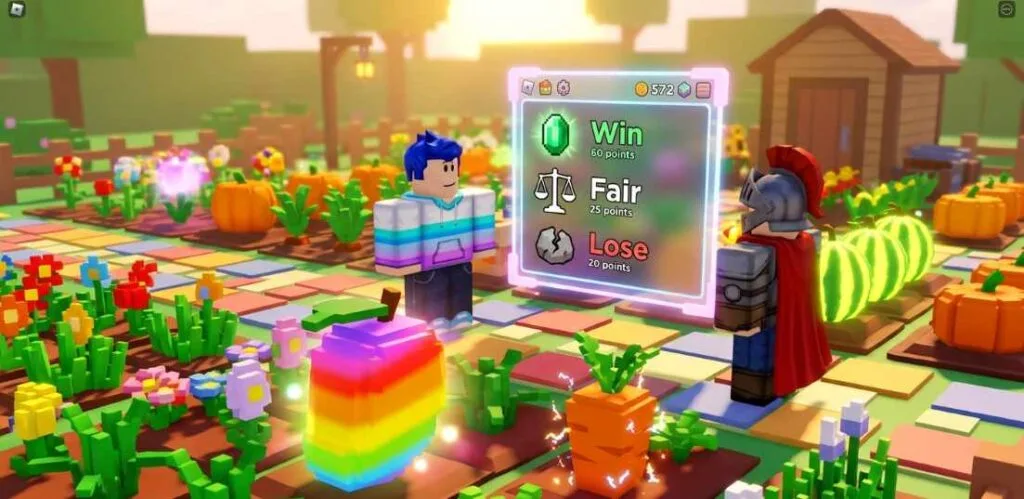
WFL stands for Win, Fair, or Lose. It is the community standard for evaluating whether a trade benefits you, costs you, or roughly balances out.
- Win — You received more value than you gave. Your side of the trade is worth less than what you got back.
- Fair — Both sides exchanged roughly equivalent value. Most calculators treat anything within a 5–10% difference as Fair.
- Lose — You gave more value than you received. Your side was worth more than theirs.
The labels sound simple. The problem is that most players evaluate trades by feel — by rarity, by how impressive a crop looks, by what someone told them in a trading server — rather than by calculated value. That instinct is almost always wrong in Grow a Garden, because the game’s mutation and weight system makes value wildly non-linear.
A common crop with the right mutation stack can be worth more than a rare exotic with none. A pet that looks impressive can be worth a fraction of a smaller, older, heavier one. The only reliable way to know what you are actually trading is to calculate both sides before the window closes.
How Crop Value Actually Works: Weight × Mutations
This is the mechanic that confuses most newer players and that experienced traders exploit relentlessly. Crop value in Grow a Garden is not determined by rarity alone. It is determined by three things working together:
Base value — every crop has a base Sheckle value per kilogram that reflects its rarity and demand in the game economy.
Weight — this is the most underestimated multiplier in the game. A heavier crop of the same species is worth dramatically more than a lighter one, before any mutations are even considered. A 100kg Mango and a 5kg Mango are not the same item. They are not even close.
Mutations — mutations multiply the base value multiplicatively, not additively. This distinction is critical. If you have a Rainbow mutation (50×) and a Shocked mutation (100×) on the same crop, the combined multiplier is not 150×. It is 5,000×. The two multipliers stack by multiplication, not addition.
Before accepting any significant trade, run both crops through the Grow a Garden Calculator with the exact weight and every mutation applied. Do not estimate. Do not accept someone else’s stated value. Calculate it yourself.
The Five-Step Trade Verification Process
Experienced players follow this sequence automatically. If you build this habit, bad trades become nearly impossible.
Step 1 — Identify the exact weight of your item. Check your inventory before the trade window opens. The weight shown there is the number that matters. Do not round it, do not approximate it.
Step 2 — Identify every mutation your item has. Apply all of them in the calculator. Silver, Wet, Moonlit, Shocked — every modifier changes the final output significantly.
Step 3 — Get the exact weight and mutations of their item. Ask directly. If they hesitate, cannot tell you, or give you a vague range, that is a warning sign worth noting.
Step 4 — Calculate both sides independently. Use the Grow a Garden Calculator for each item separately. Get the actual Sheckle value for each side.
Step 5 — Compare the totals. If the gap is under 10%, you are in Fair territory. If your side is worth significantly more, you are taking a Lose. If theirs is worth more, you are winning. Know which one is true before you click accept.
This takes under 60 seconds once you are comfortable with the calculator. It will save you items worth billions over time.
Mutation Stacking: Why Two Numbers Produce an Unexpected Third
The mutation stacking formula is where most WFL misjudgments happen, even among players who think they understand the system.
The base formula for a mutated crop is:
Value = Base Value per kg × Weight × (Tier Multiplier) × (1 + Sum of Modifier Multipliers − Number of Modifiers)
What this means practically: every additional modifier you add does not simply add its multiplier to the pile. The interaction between multipliers produces values that are much higher than naive addition would suggest. A crop with Shocked (100×) and Disco (125×) is not worth 225× base value — it is worth significantly more.
This is also why the same combination of mutations on two different crops at two different weights can produce radically different final values. The weight is always the first multiplier in the chain, and every subsequent multiplier operates on the already-weighted figure.
Before trading any heavily mutated crop, always run the exact combination through the Grow a Garden Calculator rather than estimating from memory or community price lists. Price lists show averages. The calculator shows the actual value of your specific item at its specific weight with its specific mutations
Pet Trading: Why Age and Weight Are Everything
Pet trades introduce a layer of complexity that crop trades do not have, and it is the layer where the most expensive mistakes happen.
Pet value in Grow a Garden changes over time as the pet ages and gains weight. Two players can own the identical pet species and one can be worth ten to twenty times more than the other, purely because of age and accumulated weight difference.
The key things to verify before any pet trade:
Weight is not fixed. A freshly hatched pet and a max-age pet of the same species are not comparable trade items. Always ask for the exact weight and verify whether that weight is realistic for the claimed age.
Size tier matters enormously. The difference between Giant and Super Giant classification is not cosmetic — it represents a step change in value. Even a small weight difference near a size threshold can mean a 300–500% value gap between two otherwise identical pets.
Use the Pet Weight by Age tool to verify whether the weight someone claims is consistent with what that pet should weigh at that age. Inflated weight claims are one of the most consistent scam patterns in GAG pet trading. If someone claims a weight that seems unusually high for the age they describe, check it independently before proceeding.
The Six Trade Scam Patterns to Recognize Immediately
Understanding how bad trades happen is as important as knowing how to calculate good ones. These are the patterns that experienced players have seen repeatedly in GAG trading servers:
The speed pressure tactic. Someone rushes you to accept before you have time to calculate. They create urgency — other offers incoming, limited time, whatever the story. Legitimate traders are never in a hurry. Always take time to verify.
The name confusion play. Offering an item with a similar name to a high-value item but at a fraction of the value. In a fast-moving trade window, similar crop names get accepted by mistake more often than players admit.
The partial mutation disclosure. Describing a crop as “Rainbow Mango” without mentioning it weighs 0.8kg. The mutation sounds impressive. The weight makes it nearly worthless. Always ask for weight alongside mutation confirmation.
The bulk distraction. Offering a large number of low-value items to create the visual impression of a generous trade. Quantity never replaces calculated value. Ten low-mutation common crops can still be worth less than one mid-weight single crop.
The inflated pet age claim. Stating a pet age that would correspond to a higher weight than the pet actually has, hoping you will not check the weight-to-age ratio independently.
The false community consensus. “Everyone knows this is worth X.” Community price lists are averages and can be outdated. The actual value of a specific item at a specific weight and mutation set is determined by the calculator, not by what someone in Discord said last week.
When Taking a Strategic Lose Actually Makes Sense
Not every Lose trade is a mistake. Experienced players intentionally accept slight Lose positions in specific situations:
Liquidating for immediacy. If you need Sheckles quickly or want to free up inventory slots, accepting 85–90% value on an item is sometimes the right call.
Chasing a specific mutation or species. If the item on the other side completes a set, unlocks a farming strategy, or gives you access to a mutation you need, a small calculated loss can have positive expected value beyond the raw Sheckle comparison.
New event items with volatile pricing. In the first 48 hours after a new event item appears, nobody has reliable price data. A slight Lose on a new event item is often acceptable because the uncertainty cuts both ways.
The difference between a strategic Lose and a bad trade is simply awareness. Know the calculated value difference before you accept, decide consciously whether the trade serves your goals, and make the decision on your terms.
How to Use the Calculator During an Active Trade
The practical workflow is straightforward. Before you open a trade with someone, or while the trade proposal is being discussed, open the Grow a Garden Calculator in a separate tab or on a second device.
Enter your item first — select the crop or pet, input the exact weight, apply every mutation. Note the value.
Then enter their item with the same precision. If they cannot give you exact weight and mutations, either ask them to verify it or treat the trade with appropriate scepticism.
Compare the two totals. The calculator shows you the actual numbers rather than asking you to hold mutation multipliers in your head under time pressure. Use the Value to Weight mode if someone quotes you a value and you want to verify what weight their crop would need to be worth that figure — this is the fastest way to catch an inflated claim before you accept.
Building Your Trading Reputation Over Time
Consistent fair trading builds a reputation in GAG communities that has real value beyond individual transactions. Players known for fair, calculated offers get more trade requests, better counteroffers, and access to deals that newer or unreliable traders never see.
The foundation of that reputation is straightforward: calculate every trade before you propose or accept it, offer fair value on your side, and be transparent about your methodology when asked. Serious traders respect other serious traders. Using a calculator is not a sign that you do not know the game — it is a sign that you take the game seriously enough to get the numbers right.
Quick Reference: Mutation Multipliers for Trade Calculations
| Mutation | Multiplier | How to Obtain |
| Silver | 5× | Natural fruit growth, fertilizer |
| Gold | 20× | Natural growth, Dragonfly, fertilizer |
| Rainbow | 50× | Natural growth, Butterfly, fertilizer |
| Wet | 2× | Rain weather, spray, pets |
| Frozen | 10× | Wet + Chilled combined |
| Shocked | 100× | Thunder weather, Jandel event |
| Moonlit | 2× | Night event |
| Bloodlit | 4× | Blood Moon event |
| Disco | 125× | Disco event, Discobee, spray |
| Celestial | 120× | Meteor Shower event |
| Dawnbound | 150× | Sun god event, Ascended Mutation pets |
| Sundried | 85× | Heat Wave weather |
| Aurora | 90× | Aurora Borealis weather |
Remember: these multiply together, not additively. Always use the Grow a Garden Calculator for any combination involving more than one mutation — the mental arithmetic for stacked multipliers is unreliable under trade pressure.
Muhammad Hashir
Founder, NextGen Calculators · Pakistan
Muhammad Hashir is a digital entrepreneur from Pakistan and the founder of NextGen Calculators. He built this site to replace cluttered, inaccurate calculator tools with fast, research-backed alternatives across health, finance, gaming, construction, and more. Every tool on this site is personally researched and validated before going live. When official standards change, he updates the tools. When users report errors, he fixes them.